Business Process Automation Services

We automate the work your team repeats every day.

LaPage sets up practical workflows for work such as student enrolment, class and payment management, schedules, email, orders, service jobs, and customer follow-up. Your team spends less time copying information and chasing the next step.

Built around the way your team already worksRoutine steps move without copying and pastingStaff are alerted when something needs attentionThe business keeps its records and operating history

Customer example

SWS Centre student operations

One connected flow

Student records

Classes and progress

Operations

Fees and schedules

Create or update the student record
Place the student in the right class
Track payment and learning schedules
Send the right email to the right group

Staff still handle the cases that need judgment

A late payment, class change, missing student detail, or examination reschedule becomes a clear task instead of getting lost in messages.

What LaPage sets up

Automation that keeps routine work moving without waiting for somebody to remember.

LaPage connects one real business process from start to finish. Information moves to the right place, routine steps happen on time, and the team receives a clear task when something needs attention.

What we build

A connected workflow

We connect the forms, records, Tools, assignments, and status updates used by one business process.

How it helps

Information is entered once and moves to the next step without staff copying it between spreadsheets, messages, and systems.

Business value

Fewer handoffs are missed, and the team spends less time moving information by hand.
What we build

Automated handoffs and notifications

We set up task assignments, confirmations, reminders, and approved messages around the rules of the process.

How it helps

The right person receives the next task with the information they need instead of waiting for somebody to chase them.

Business value

Routine work keeps moving and depends less on personal memory.

What we build

An exception and action queue

We surface missing information, overdue work, failed steps, and cases that require a person to decide what happens next.

How it helps

Staff can focus on the unusual cases instead of repeatedly checking whether every normal step happened.

Business value

Problems become visible earlier, before an internal delay grows into a customer issue.

What we build

Monitoring, recovery, and operating history

We provide visible status, safe retry paths, action history, and clear ownership when a workflow stops or changes.

How it helps

The team can see what happened, resume the work, and improve the process from real operating evidence.

Business value

Important work is easier to audit and less dependent on one employee knowing the whole process.

Where automation helps

If your team keeps doing this by hand, there is probably a better way.

Most businesses do not need a grand automation strategy. They need a few tiring processes to stop depending on spreadsheets, chat messages, and somebody remembering what comes next.

Common starting points

The same information is copied between tools

A customer, student, order, payment, or booking is entered into a form, then copied into a spreadsheet, a chat, and another system.

People spend the day reminding one another

Follow-ups, payment reminders, schedule changes, approvals, and handoffs happen only because someone remembers to chase them.

Management keeps asking for status

The answer sits across several people and files, so nobody can quickly see what is complete, late, unpaid, or waiting.

Customers feel every missed internal step

A forgotten email, delayed confirmation, or outdated schedule becomes a customer-service problem even though the cause is internal.

Customer story: SWS Centre

A language school has much more to manage than a teaching timetable.

SWS Centre teaches German to Vietnamese learners. Behind each class are student records, enrolment, fees, learning schedules, examination schedules, email communication, and staff follow-up. LaPage connected that daily work into one operating flow.

01

Student record

Staff keep the learner's contact details, course information, and current status in one place.

02

Class management

The student is connected to the right class, teacher, learning period, and timetable.

03

Fees and payment

The team can see what has been paid, what is due, and which cases need follow-up.

04

Learning and exams

Learning schedules and examination schedules stay connected to the right students and classes.

05

Mailing

The right group receives the right notice when a class, payment, schedule, or examination update needs to be communicated.

What becomes easier

Staff update the work once, then the next steps follow from it.

A class change can update the operating record and prepare the relevant communication. A payment status can become visible to the right staff without another spreadsheet. A schedule belongs to the student and class instead of living in a separate chat thread.

What staff still control

The system does not make sensitive decisions for the school.

Staff still decide how to handle a late payment, move a student, change an examination, or answer a special request. The system makes the case visible and gives them the information they need.

More work LaPage has delivered

Different businesses, the same practical goal: stop losing work between steps.

Some customer names remain private, but the operating work is real. These systems were built around the records, handoffs, payments, schedules, and exceptions teams manage every day.

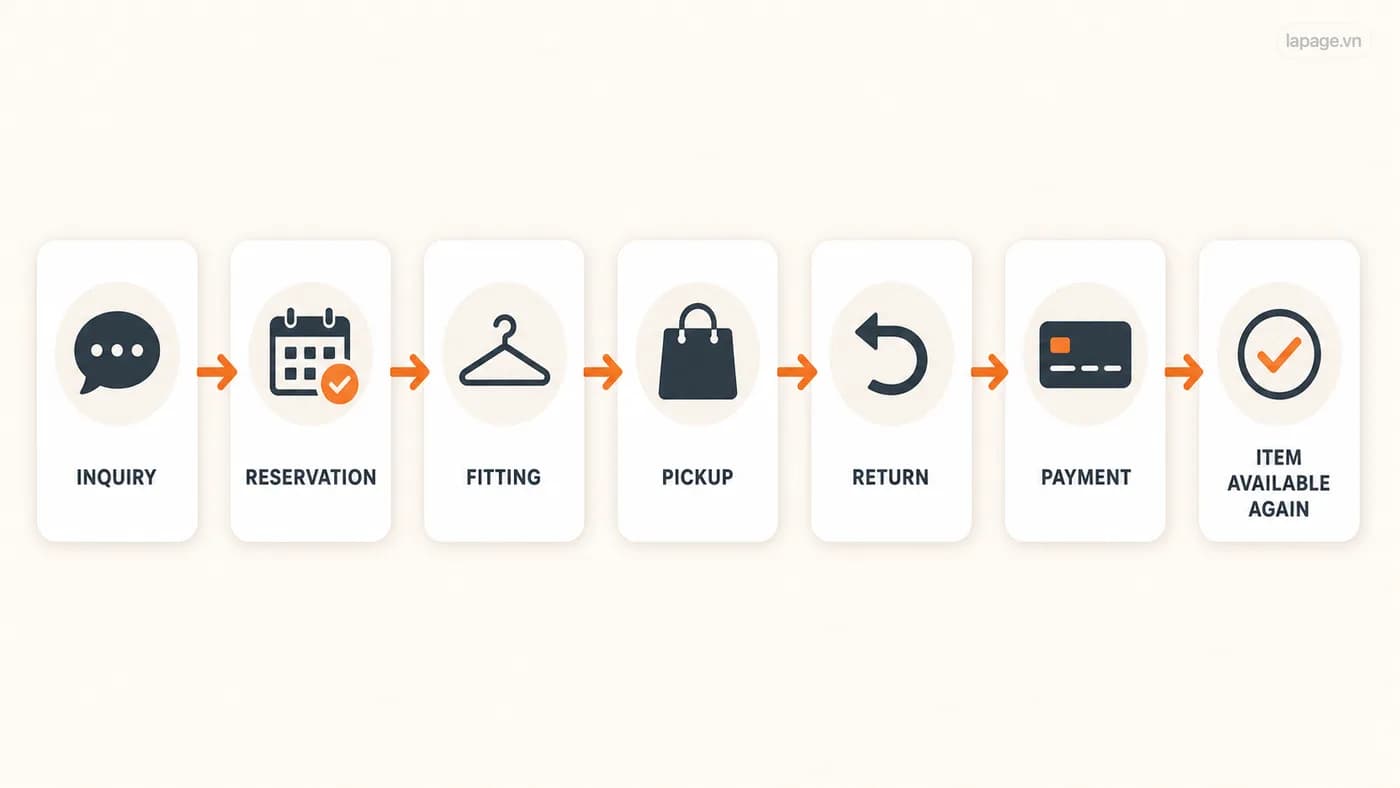
Tiệm Thanh Xuân

Clothing rental from enquiry to return.

LaPage rental workflow showing enquiry, reservation, fitting, pickup, return, payment, and the item becoming available again.

LaPage helped structure rental bookings, customer records, item status, deposits, payments, returns, and daily management into one clearer operating system.

The work begins

A customer asks about an item or makes a booking.

What the system moves

The booking stays connected to the customer, item, dates, deposit, payment, pickup, and return.

What becomes visible

Late returns, unavailable items, missing payments, and items needing cleaning or repair no longer hide in chat history.

What people decide

The shop decides substitutions, special arrangements, refunds, and customer conversations.

Retail operations

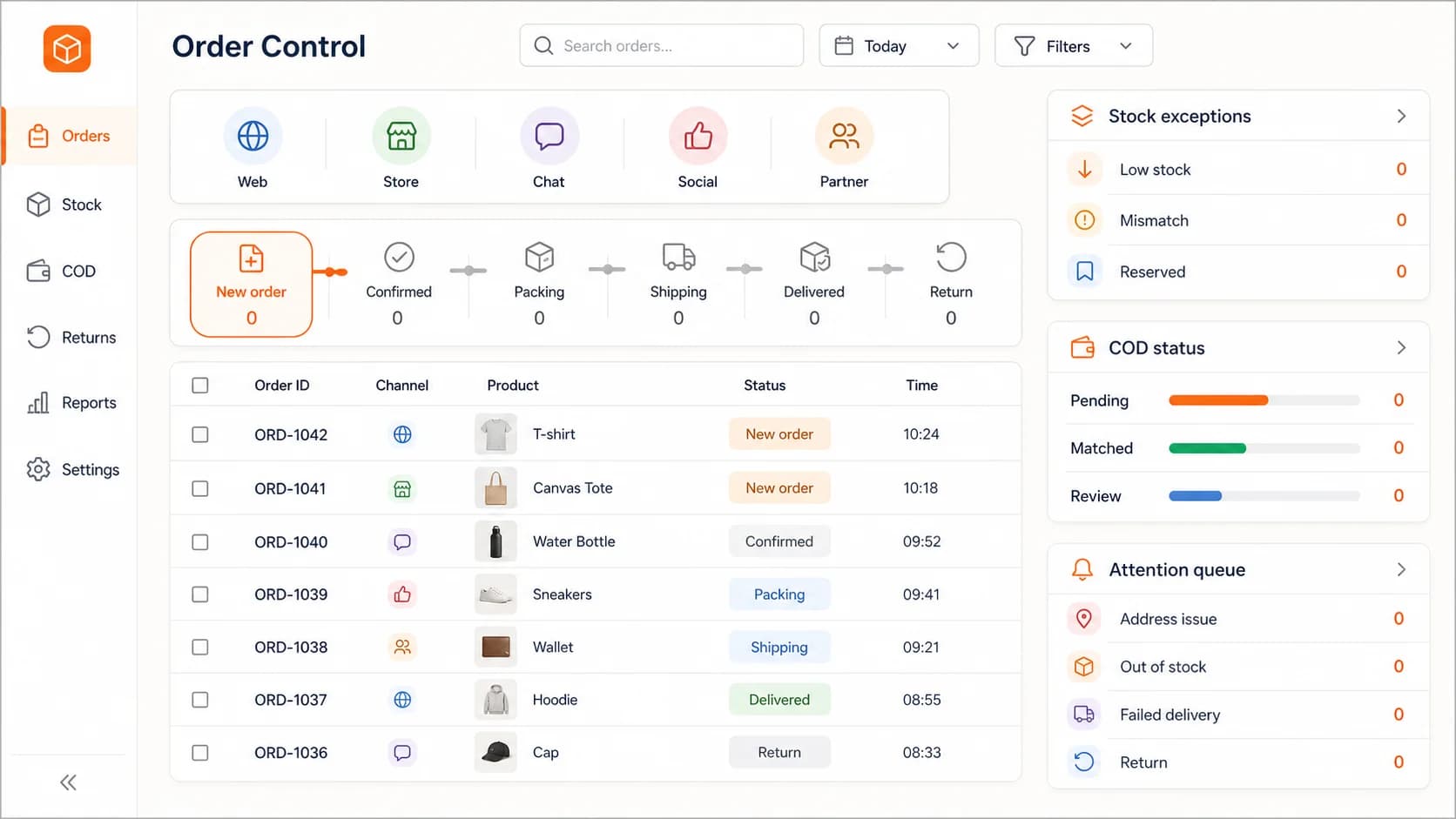
Orders from several channels into one fulfilment flow.

LaPage order operations interface connecting sales channels, inventory, COD, fulfilment, and exceptions.

For a retail operation, LaPage brought orders, stock checks, COD status, fulfilment tasks, and delivery exceptions into one shared view.

The work begins

An order arrives from the website, a sales channel, or a staff member.

What the system moves

The system records the order, checks the required information, and moves it toward stock reservation and fulfilment.

What becomes visible

Low stock, payment mismatch, duplicate details, or delivery problems are separated for attention.

What people decide

Sales and operations decide substitutions, corrections, cancellations, and customer follow-up.

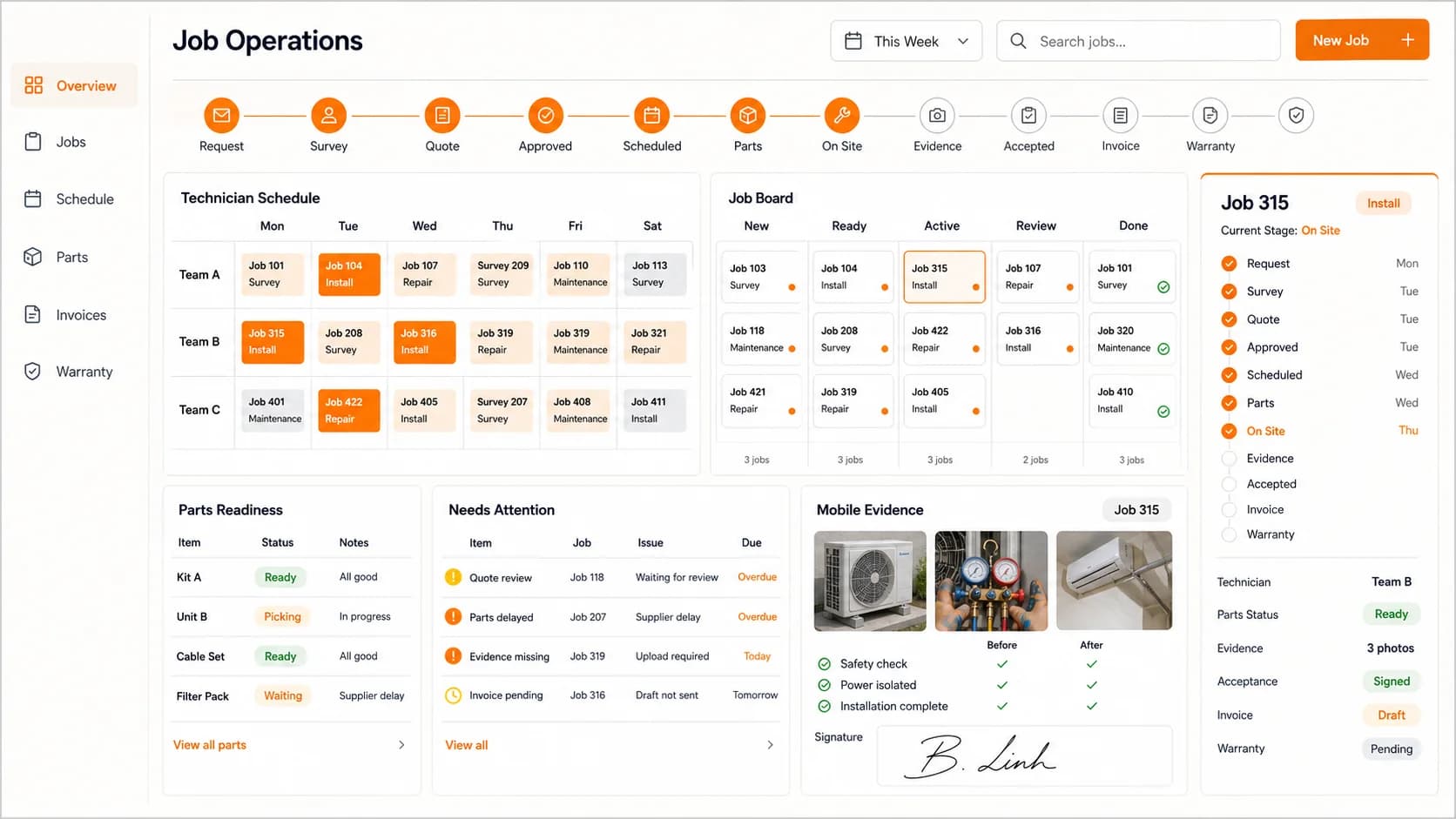
Field service

Service requests from booking to completion.

LaPage field-service operations interface showing jobs, technician assignment, schedules, completion evidence, and pending actions.

LaPage built a flow for service and installation work so requests, technician assignment, schedules, completion evidence, and pending actions stay together.

The work begins

A customer requests installation, repair, inspection, or another field visit.

What the system moves

The job is recorded, assigned, scheduled, updated from the field, and moved toward completion and billing.

What becomes visible

Missing parts, schedule conflicts, incomplete evidence, or a failed visit becomes a visible case.

What people decide

The coordinator decides reassignment, rescheduling, customer communication, and escalation.

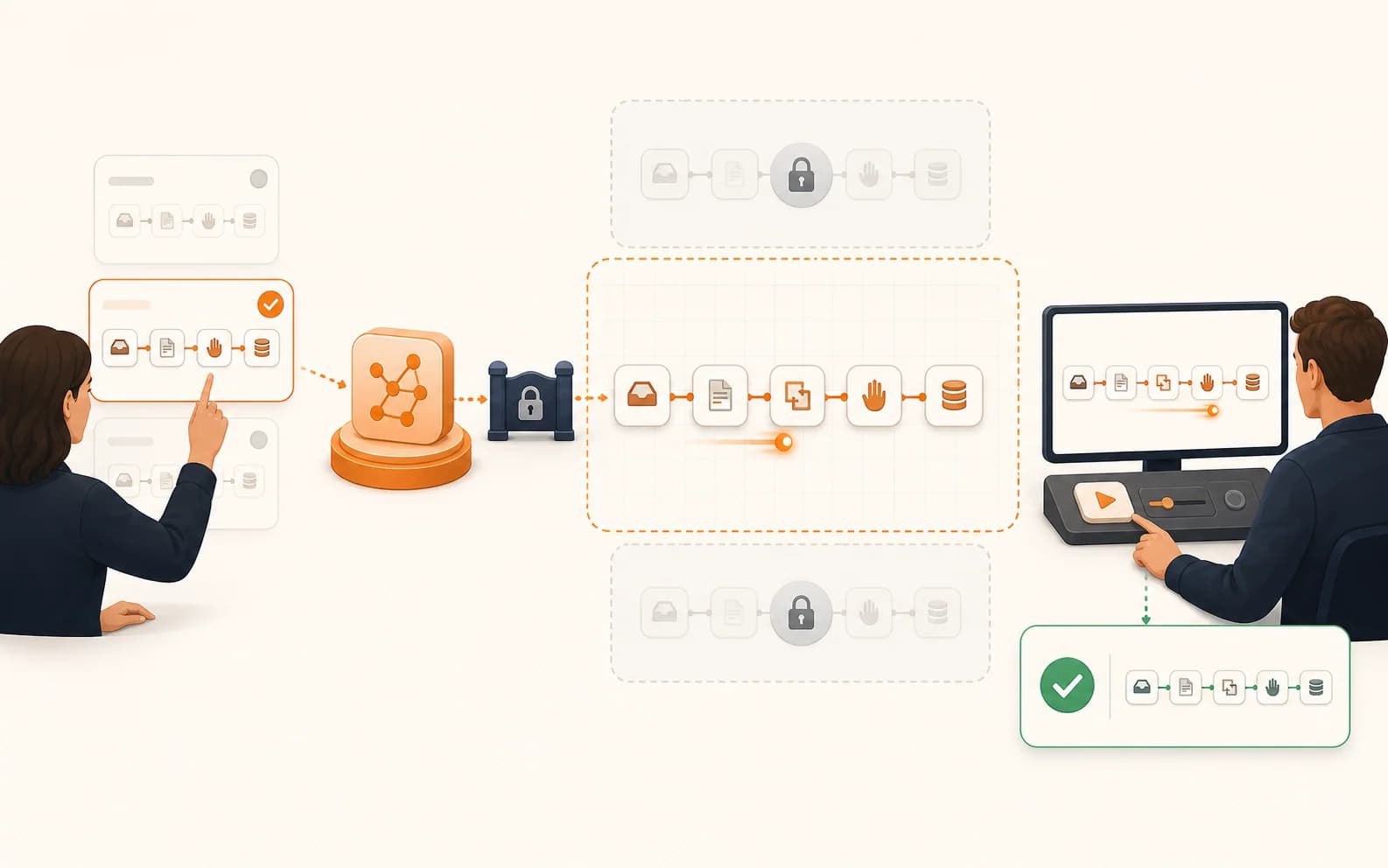
Working demonstration

Website enquiries routed to the sales team.

LaPage illustration of a website enquiry workflow being built, tested, reviewed, and activated.

LaPage's published n8n MCP demonstration receives a website form, checks required information, saves the lead, notifies sales through Telegram, and requires review before activation.

The work begins

A visitor submits the website enquiry form.

What the system moves

The lead is checked, stored, assigned, and sent to the agreed sales channel.

What becomes visible

Missing information or a failed save stops the flow and keeps the original request available for recovery.

What people decide

Sales handles the conversation; the workflow owner approves changes before they go live.

A sensible boundary

The system handles the routine. Your team handles the conversation.

Automation should remove avoidable admin work, not remove responsibility. LaPage agrees this boundary with the people who run the process before anything goes live.

The system can

Move known work forward

These steps should happen the same way when the same conditions are true.

  • Update records and status
  • Assign routine tasks
  • Send approved reminders and emails
  • Flag missing information and overdue work
Your team still

Owns decisions and relationships

People take over when context, trust, money, or an unusual case matters.

  • Approve important commitments
  • Handle special requests and complaints
  • Resolve conflicting information
  • Change the operating rules

When a day does not go to plan

A failed step should become a task, not a mystery.

Real businesses have late payments, changed schedules, missing information, unavailable stock, failed messages, and systems that temporarily stop responding. We design those cases into the workflow from the beginning.

Day-to-day controlProblems stay visible

Tell the right person

A failed or overdue step creates a clear alert for the person who can act on it.

Try again safely

Temporary failures can retry without sending the same email twice or creating a duplicate record.

Keep the original information

The customer, student, order, or job details remain available so staff can correct and continue the work.

Show what happened

Staff can see when the workflow ran, which step succeeded, where it stopped, and who took over.

How a project starts

Choose one painful process. Make it work properly. Then expand.

The first project does not need to automate the entire company. It needs to remove a real daily burden and prove that the new way of working is easier to run.

01

Show us the current work

We sit with the people doing the job and map the forms, spreadsheets, messages, approvals, deadlines, and exceptions they handle today.

02

Build one complete flow

We connect the necessary tools, test normal and messy cases, and let the team review the workflow before it is activated.

03

Handover and improve

We document the flow, show the team how to operate it, agree who owns exceptions, and improve it when the real business process changes.

What affects the fee

We quote after seeing the process. A single reminder flow is different from a school operation connecting student records, classes, fees, schedules, examinations, and email. You see the scope before implementation begins.

Processes included
Systems to connect
Approvals
Unusual cases
Business importance
Ongoing support
Work we can walk you through

Real operating systems, not a list of automation ideas.

SWS Centre and Tiệm Thanh Xuân are named examples of systems LaPage has built around real business operations. Other customer examples are anonymized. The published lead workflow can also be inspected as a working demonstration.

  • SWS Centre: students, classes, fees, learning and examination schedules, and mailing
  • Tiệm Thanh Xuân: rentals, item status, bookings, customers, deposits, payments, and returns
  • Anonymized retail order and field-service operations
  • Published website-enquiry workflow with testing and review before activation
Inspect the lead workflow demonstration

Continue exploring

See practical assets, customer work, and related services.

Explore n8n templatesReview case studiesView all services

Start with one process

Tell us the work your team is tired of chasing.

Show us the spreadsheets, messages, reminders, and handoffs involved. LaPage will help you choose a practical first workflow and explain what it would take to build it.

Call: +84 981 690 658
Message us on Facebook
Zalo
Contact us on Zalo
Contact us