
Own Your Systems
Paying for AI by international card or VND bank transfer with a VAT invoice? Buying direct vs LaRouter
Nov 13, 2026 · 5 min read

Picture data as water flowing through modules: sales, operations, delivery, finance. Why a modular system lets a business add new things without breaking old ones, with a real example from LaPage ERP.
Most small businesses' operating systems grow the way the cables behind a desk do.
It starts with one Excel file for orders. Then a warehouse app. Then a Zalo group for delivery updates, a separate debt spreadsheet for the accountant, and an invoicing tool someone installed one afternoon. Each piece gets "temporarily" wired to the next so things keep running. A few years later you have a knot that nobody dares pull a single cable out of.
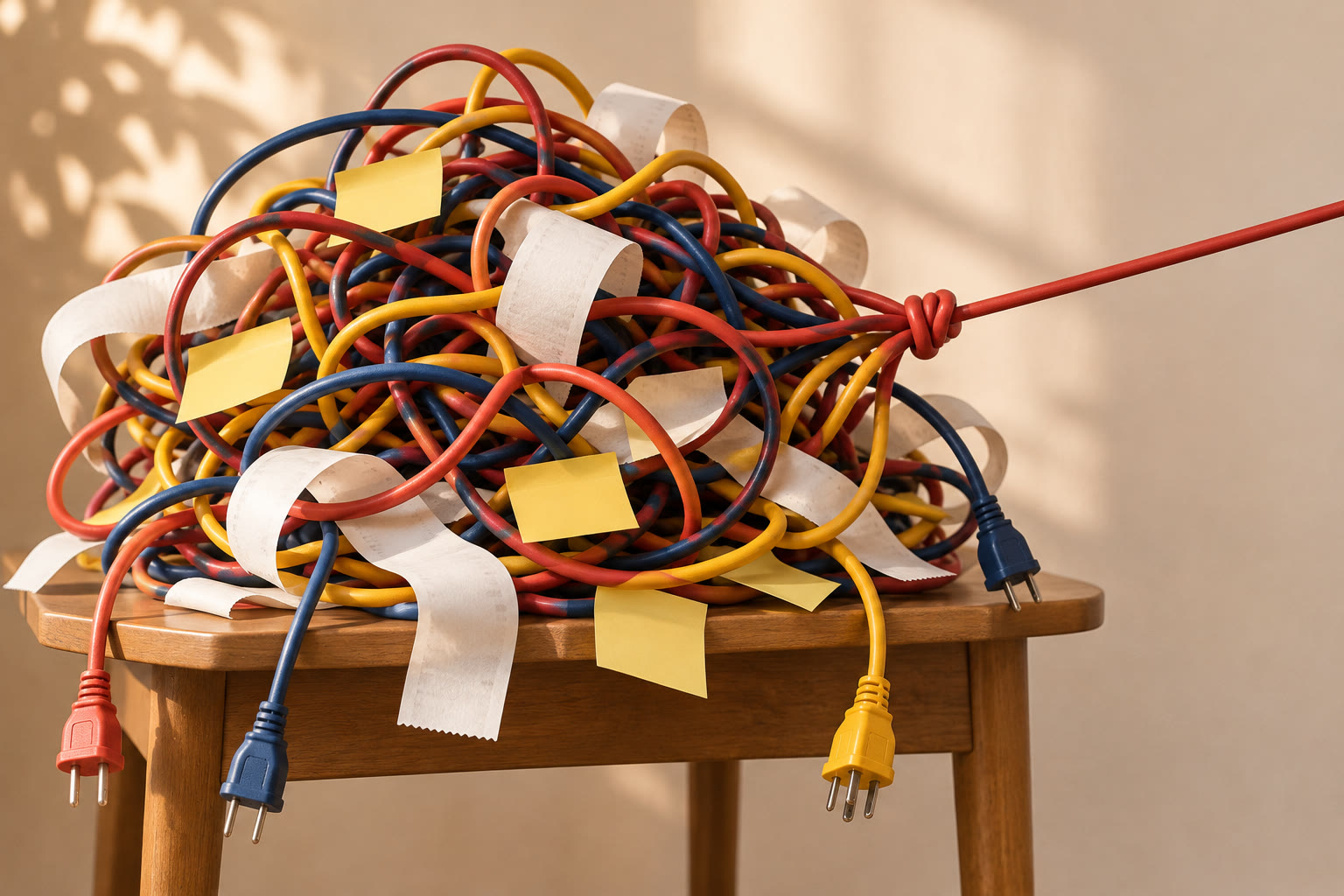
The signs are familiar. Fix one thing and something else breaks. Change your delivery partner and the accountant has to change how they work too. Ask for a new sales channel and the person who maintains the system sighs: "That's basically a rebuild."
The problem is usually not whether the software is good or bad. It's how the pieces are joined together.
Prefer watching? Watch the explainer video, just under 4 minutes (in Vietnamese).
A well-designed system works like a company with clear departments: sales, warehouse, delivery, accounts. Each department does its own job, then hands the order on to the next.
The system works the same way, and the easiest way to picture it: an order flows like water through pipes.
Each department has its own part of the system (engineers call it a module), like a box sitting on the pipe. Whatever water flows through a box gets "coloured" by it: a new status, a number, a piece of information. Each box only looks after its own colour and keeps its hands out of the box next door.
Take one order, from the moment a customer places it to the moment the invoice goes out.
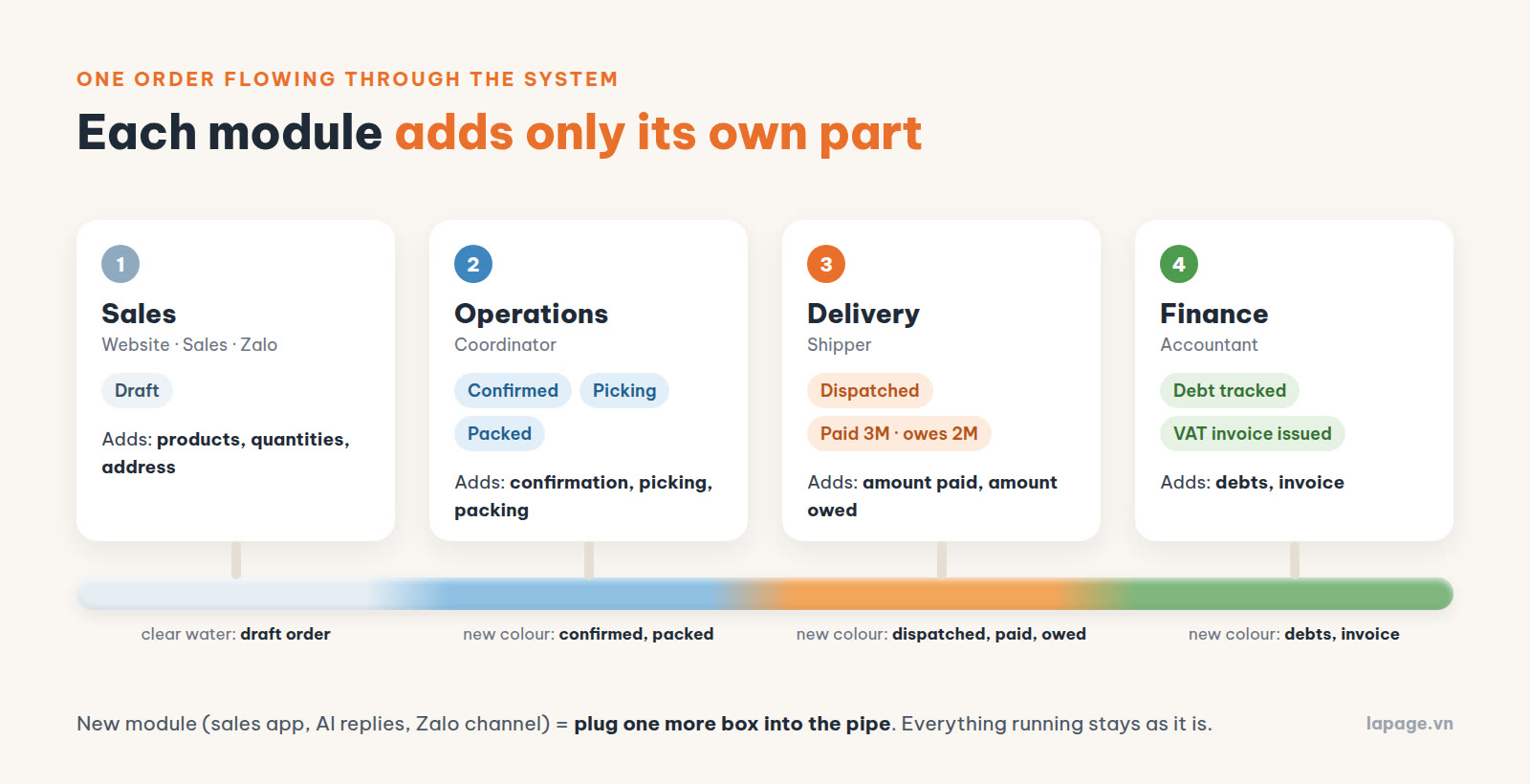
1. Sales. The customer orders on the website, through a salesperson or over Zalo, and the order is created. At this point it's clear water: status Draft, with products, quantities and an address.
2. Operations. The coordinator checks and confirms the order, moving it to Confirmed. The warehouse picks and packs it: Picking, Packed. This module doesn't need to know anything about debts or invoices. Its only job is getting the order handled correctly.
3. Delivery. The goods leave the warehouse, the order becomes Dispatched and joins the shipper's delivery run. The shipper can update the order too, but only within their own job: the customer paid in full, or paid 3 million and still owes 2 million. The shipper can't change the price or delete the order.
4. Finance. The amount collected and the amount still owed flow on to finance. The accountant tracks each customer's debt, reconciles payments and issues the VAT invoice. Nobody has to call the shipper to ask "how much did we collect on this one?", because the number has already arrived, correct and complete.
By the end of the pipe, the water carries every colour: who ordered, who confirmed, when it shipped, how much was paid, how much is owed, whether it's been invoiced. Each colour was added by exactly one module.
Engineers call this principle separation of concerns. In plain terms it comes down to three things:
The opposite is "everything in one lump": stock, orders and debts all share one big table, anyone can edit anything, and every new feature drills another hole through the middle. It really is faster at the start. But the bigger it gets, the scarier it is to touch.
This sounds like a concern for whoever writes the software, but the owner benefits most.
Add new things without breaking old ones. Want an app for your sales team, AI that answers customers, or a Zalo channel? That's plugging one more module into the pipe. Everything already running stays as it is.
Replace one part, not the whole system. Switch delivery partners and only the delivery module changes. Switch invoicing software and only finance changes. The warehouse team doesn't have to relearn anything.
Problems show up where they are. If the water comes out the wrong colour at one point, you know which box to look at. No more tracing cables through the knot.
Grow at your own pace. If today you only need orders and delivery, build those two modules well. Next year, when you need debt tracking or reports, add them on top of what you already have.
In short: solve today's problem without blocking tomorrow.
This isn't just theory. LaPage ERP, the operating system we built for a pharmaceutical distributor in Ho Chi Minh City, is designed exactly this way. Their scale: 300 to 700 orders a day, around 40 lines per order.
The system is split into modules along the real areas of the business: Sales, Products, Warehouse, Delivery, Finance and Reports. An order passes through exactly the statuses above: Draft, Confirmed, Picking, Packed, Dispatched.
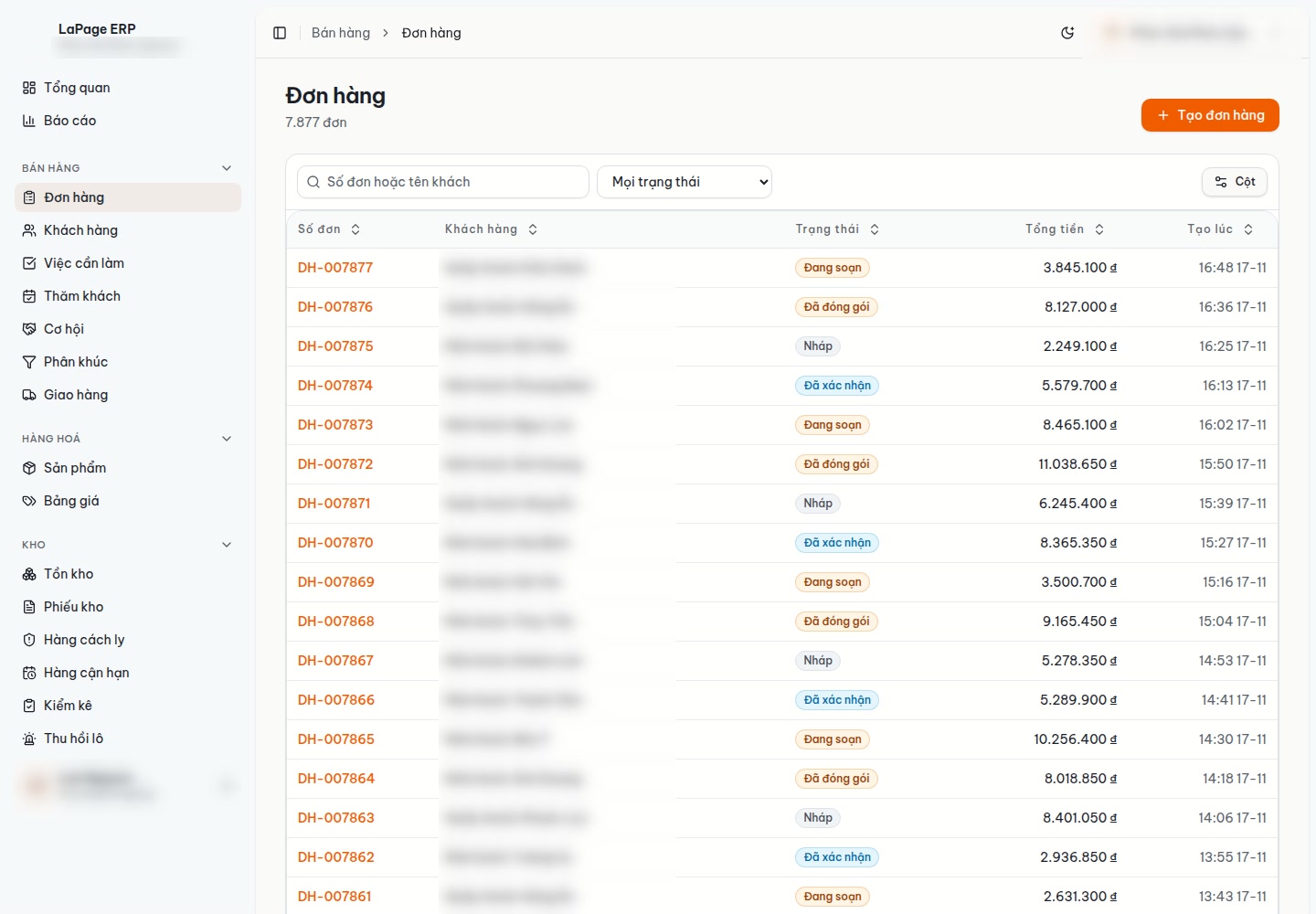
A few places where "each module minds its own part" shows up in practice:
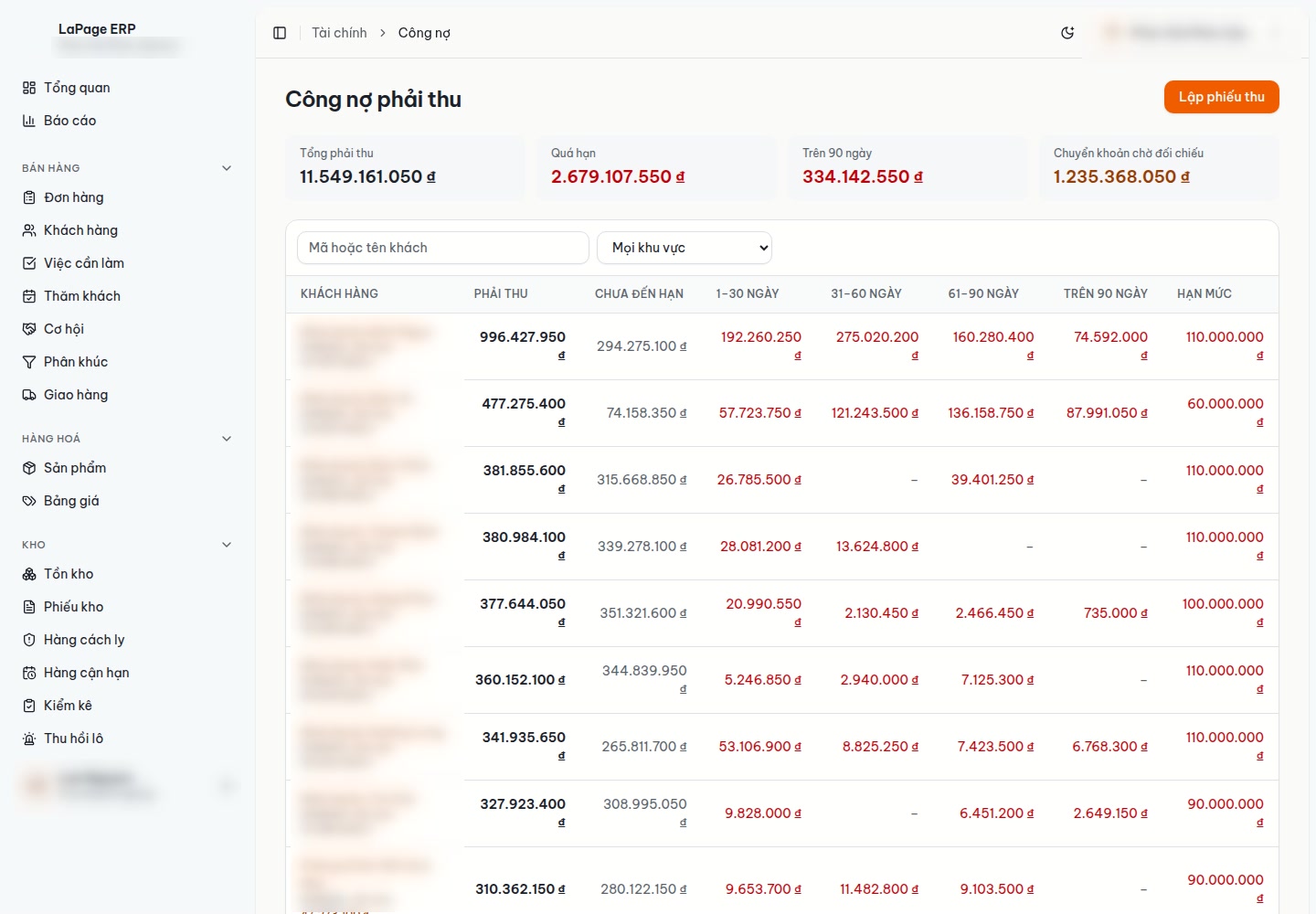
The clearest proof of this design is how we built it. LaPage ERP was built one module at a time: the foundation and orders first, then delivery, finance, purchasing and stock, customer relationships, and reports. Every time a new part was added, the whole system was checked again from scratch, and the earlier parts still worked correctly. New things added without breaking old ones, which is the whole point of this article.
Modularity doesn't make the system slow, either. We tested 700 orders of 40 lines each, entered by 16 staff at the same time: zero errors. With a year's worth of data at this scale (over 255,000 orders and about 10 million order lines), reports still come back in under half a second.
Modularity needs a sense of proportion. A small shop doesn't need twenty modules, because every extra pipe is one more thing to look after. Clean design means splitting in the right places: along the genuinely different areas of work in the business, and along the way the team actually works each day.
Designing like this also takes a little more thinking up front. In return, every later expansion is far less stressful.
As with LaPage ERP, when we build an operating system for a client, we start from how the business actually runs, not from a feature list. We map how orders, money and goods flow, then split the system into modules along those lines.
If your system looks like the knot at the top of this article, see how LaPage builds custom business software or send us a message. And if it's not that bad yet: right now, how many files and chat groups does one of your orders pass through before it reaches your accountant?
LaPage Digital publishes systems-focused writing on architecture, automation, infrastructure, and operational delivery.

Subscribe to our newsletter to receive technical insights and updates on best practices for web development and hosting infrastructure.